
Rosetta Stone Sapphire
Rosetta Stone LtdEducation
4.578.00 Reviews
- Version
- 1.1.3
- Installs
- 50.00K
- Age Rating
- Everyone
Screenshots
Our Review of Rosetta Stone Sapphire
 Analysis by Appyee
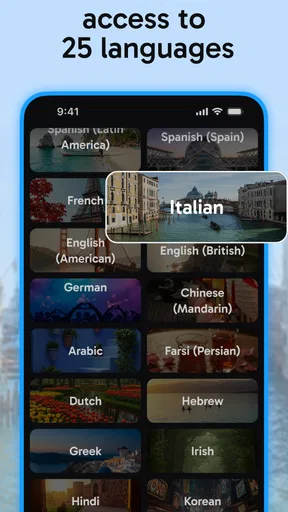
I approached Rosetta Stone Sapphire as a language-learning app for ordinary moments rather than as a quick vocabulary toy. Its focus is practical study across languages such as Spanish, Dutch, English, Polish, and Japanese, and that immediately gives it a useful place in the education category. I can imagine opening it before work, during a quiet commute, or at home when I want a structured way to keep a language active.
The first thing I noticed is that the experience asks for attention. This is not the sort of app I would recommend if you want to tap through a few entertaining questions with the sound off. It is better suited to someone who wants to build a repeatable study habit and is willing to listen, look closely, and respond. That distinction matters for accessibility as much as it matters for learning style.
Rosetta Stone Ltd is the developer, and the app is free to install, with in-app purchases priced at $19.99 per item. It is rated for Everyone, runs on operating systems from version 10 onward, and the current release is 1.1.3. Those details make it approachable for a broad audience, although the purchase model means I would still check the available learning access before committing to a longer study routine.
How the learning experience reads and moves
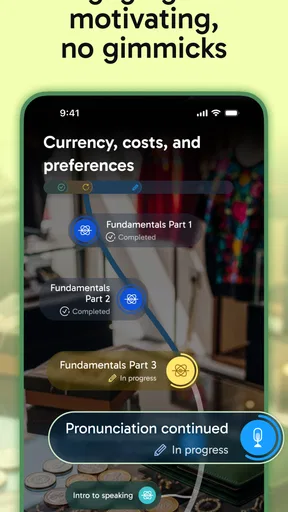
In my experience, the biggest strength of this app is its sense of direction. A language learner can easily become lost in a large collection of disconnected words, but a guided lesson gives each session a clearer purpose. I found that useful when I had only a short period available: instead of deciding what to study from scratch, I could concentrate on the exercise in front of me and keep moving.
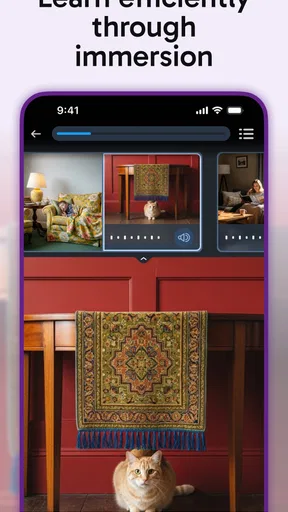
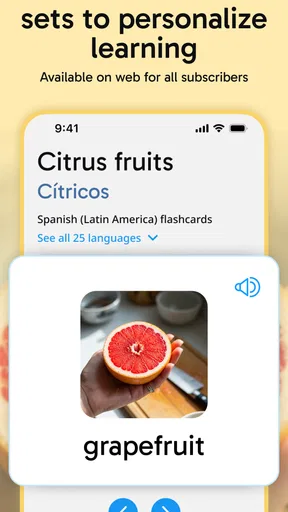
The visual side is most comfortable when I give it my full attention. Language learning depends on recognizing relationships between images, written terms, and spoken expressions, so the screen is doing more than displaying decoration. For a person with good near-screen vision, that combination can make meaning easier to remember than a plain translation list. For someone who needs larger text, stronger contrast, or more time to interpret a screen, the same design may require extra effort.
I would not judge readability only by whether individual words look clear. The more important question is whether a learner can understand what action comes next without hesitation. In a study app, uncertainty about the task can be more tiring than the vocabulary itself. I found it helpful to pause rather than rush, especially when an exercise introduced a new pattern. That slower approach also makes the app more realistic for learners who process information gradually.
A useful habit is to treat each session as a small sequence rather than as a test of speed. I would begin in a quiet place, read the prompt carefully, listen before answering, and repeat difficult items immediately instead of saving every mistake for later. This turns the interface into a manageable routine. It also reduces the pressure that can make a learner abandon a lesson after one confusing screen.
The app is less appealing to people who prefer a highly customizable dashboard. If you want to choose every topic, rearrange every lesson, or build a study plan around a narrow professional vocabulary, a more specialized course may feel more flexible. Rosetta Stone Sapphire makes more sense when I want the structure to do some of the planning for me.
Another point is cognitive load. A beginner is already handling unfamiliar sounds, spelling, and sentence order. Adding constant switching between menus or reference screens can make that harder. The guided approach helps by keeping the immediate task visible, but I still recommend short sessions. Ten focused minutes can be more productive than a long sitting in which concentration fades and every correction starts to feel discouraging.
Why the format can help different learners
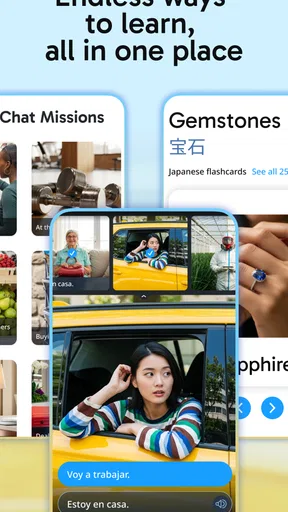
I like the possibility of learning through more than one channel. Seeing a word, hearing it, and connecting it with a situation can support memory in a way that a written glossary does not. This is particularly useful for someone who struggles to remember isolated translations. The learner can build a sense of meaning from context instead of treating every new term as a separate fact.
At the same time, this approach is not automatically inclusive for everyone. A learner who depends primarily on text may find spoken work demanding, while a learner with limited vision may find image-based distinctions difficult. The app can still be worthwhile, but the right expectations are important: it is a multimodal study experience, not simply a text course that happens to include audio.
Voice, touch, and the practical conditions of study
Language practice can place different demands on the body. Listening requires a usable audio environment, while speaking practice requires enough privacy and confidence to produce unfamiliar sounds aloud. Touch-based navigation also matters for people who have limited dexterity or who use a device in motion. I found the app easier to appreciate when I treated these as part of the setup rather than as minor details.
For a learner with hearing limitations, visual information may be especially important. Written prompts and visible context can provide an anchor, but they do not replace every benefit of hearing pronunciation. I would approach the app with a personal test: try a short session in the way you normally learn, then notice whether the exercises remain understandable when listening is reduced or unavailable. If too much of the lesson depends on audio, another text-first resource may be a better companion.
The same practical test applies to speech. Someone who cannot speak comfortably, uses an alternative communication method, or studies in a shared room may not be able to use every speaking-oriented activity as intended. That does not make the app useless; reading, listening, and visual association can still support progress. It does mean that the product is a weaker fit for a learner who needs every activity to work without spoken responses.
My best workaround is to separate recognition practice from production practice. I would first review the written and spoken material privately, then reserve pronunciation work for a time and place where speaking is comfortable. This avoids turning a noisy bus, an office, or a family room into a frustrating classroom. It also makes the app more practical for people whose energy or physical comfort changes during the day.
Touch interaction can be another dividing line. If repeated tapping, small targets, or quick responses are difficult, rushing is likely to increase errors that have nothing to do with language ability. I would use a stable surface, keep the device positioned comfortably, and take breaks before hand fatigue appears. The app is more useful when the learner can concentrate on language rather than fighting the hardware.
People with attention differences may appreciate the clear boundaries of a lesson, but they may also find repetition tiring. I would use a timer and stop at a natural break instead of continuing until the material becomes noise. A short, predictable routine can work well: one lesson segment after breakfast, a review later, and no expectation that every session must be long. This is a more sustainable use than trying to compensate for missed days with an exhausting marathon.
For children, the Everyone rating makes the app broadly approachable from an age-classification perspective, but that should not be confused with a guarantee that every child will find it easy to use independently. A younger learner may need help choosing a language, understanding instructions, or staying with a less immediately playful activity. I would see it as a possible family learning tool, not automatically as a child-directed game.
Using it when life is not perfectly quiet
Situational access is where many language apps succeed or fail. Imagine a commuter with fifteen minutes before a shift. If the train is crowded, the surroundings are noisy, and speaking aloud would be awkward, that person can still use a visual review session, but the full learning experience may not be available. I would plan audio and pronunciation work for home, then use quieter recognition activities while traveling.
That same split works for a parent whose schedule changes constantly. A short session during a child’s nap may be realistic, while a fixed uninterrupted hour is not. The app’s structured nature helps because I do not need to invent a curriculum each time I return. The trade-off is that interruptions can break concentration, so I would avoid beginning a difficult lesson when I know I may have to leave after only a few minutes.
It can also suit travelers preparing for a specific trip, but I would not rely on it alone for urgent communication. Building familiarity with a language takes repetition, and a traveler may also need a phrase reference, translation tool, or local pronunciation guide for immediate situations. Rosetta Stone Sapphire is better for preparing the underlying habit of listening and recognizing patterns than for acting as an emergency conversation aid.
For students, the app may provide useful independent practice outside a classroom. I would use it to reinforce regular study, especially when I want more exposure between lessons. I would not expect it to replace a teacher when I need detailed correction, cultural explanation, or help with a very specific academic assignment. A guided app can give me momentum, but a person can respond to an individual misunderstanding in a way a fixed exercise cannot.
The free price lowers the barrier to trying it, which I appreciate. Still, the in-app purchase structure changes how I would evaluate it. I would spend time with the accessible portion first and decide whether the learning flow matches my needs before paying for additional content. At $19.99 per item, an occasional learner may see the purchase differently from someone planning a serious long-term routine. The right value depends on how consistently I will use it, not just on the initial download cost.
The app has reached over fifty thousand installs and holds a 4.5 average from hundreds of ratings, which suggests that many users find the overall experience worthwhile. I treat those figures as a useful signal rather than a substitute for personal testing. Accessibility is highly individual: a design that feels calm and clear to one learner can feel visually busy, physically demanding, or too audio-dependent to another.
Where the inclusive experience still has limits
The most important limitation is that broad language coverage does not automatically mean broad access. Supporting Spanish, Dutch, English, Polish, Japanese, and other languages gives learners choice, but the learning path still has to fit their preferred way of receiving information. I would not choose this app solely because it offers my target language. I would first ask whether its combination of visual, listening, and active practice suits me.
It is also not the best match for someone who wants instant translation. A translation app is usually faster when I need to understand one unfamiliar sentence right now. A flashcard tool may be better when I want to control a personal word list. A live tutor is stronger when pronunciation feedback, motivation, or conversation confidence is the main problem. Rosetta Stone Sapphire occupies a middle ground: more guided than a loose collection of flashcards, but less personally responsive than a teacher.
Advanced learners may reach its limits sooner than beginners. If I already understand everyday grammar and want debate practice, industry-specific vocabulary, or nuanced writing correction, a general structured course may not provide enough challenge by itself. I would pair it with reading, conversation, and authentic media rather than expecting one app to cover every stage of fluency.
There is a motivational trade-off as well. Some learners need visible game mechanics, social competition, or constant rewards to return every day. This app will not be my first recommendation if entertainment is the main source of discipline. Its value is clearer for people who enjoy a calmer, lesson-centered approach and can create their own reason to keep going.
Another barrier is the need to make personal adjustments. I would not assume that every learner can use the same lesson length, audio setting, posture, or response method. Someone with fatigue, migraines, limited mobility, hearing loss, or visual strain may need to divide practice into smaller pieces. That flexibility comes from the learner’s routine rather than from a promise that the app will solve every access need automatically.
My practical evaluation method is simple. I would try the app at the time of day when I genuinely plan to study, with the device and environment I normally use. I would check four things: can I read the prompts comfortably, can I understand the task without help, can I participate without pain or embarrassment, and can I continue when audio or speaking is not practical? If the answer is no to several of these, another learning format may be kinder and more effective.
Who I would recommend it to
I would recommend it to a beginner who wants a guided path and likes learning through a combination of visual context, listening, and repetition. It also makes sense for a returning learner who needs to rebuild confidence without designing a full curriculum. The broad language selection is useful for households or individuals who may move between different study goals over time.
I would be more cautious for someone who needs a fully text-based experience, cannot comfortably use audio, or requires detailed human correction. I would also steer away from it as a sole resource for urgent travel translation, advanced professional writing, or highly specialized conversation. In those cases, a translation utility, tutor, reference course, or targeted vocabulary system may serve the immediate need better.
For me, the strongest use is as a steady foundation. I would combine it with real listening, simple reading, and occasional conversation so that recognition becomes usable communication. A good routine might be a short guided session, a review of the expressions that caused trouble, and then a real-world attempt to notice or use one of them. That final step is what keeps the app from becoming an isolated exercise.
My inclusive verdict is positive but qualified. Rosetta Stone Sapphire offers a focused way to study several languages, and its structured format can reduce the planning burden that often stops beginners from starting. The free entry point is inviting, while the paid items deserve a deliberate decision based on actual use. The experience is strongest for learners who can work with visual and spoken material in a calm, repeatable routine.
My recommendation is to try it as a flexible study foundation, not as a universal solution. If the screen is comfortable, the lesson pace feels manageable, and speaking or listening fits your circumstances, it can become a dependable part of your week. If your needs center on text-only access, instant translation, advanced conversation, or personal coaching, I would choose a more specialized alternative or use one alongside it. That honest distinction is what makes this app worth considering: it has a clear learning purpose, but the best results come when that purpose genuinely matches the way you can study.
Verdict
Strengths of Rosetta Stone Sapphire
- Immersive lessons build practical vocabulary through repeated exposure.
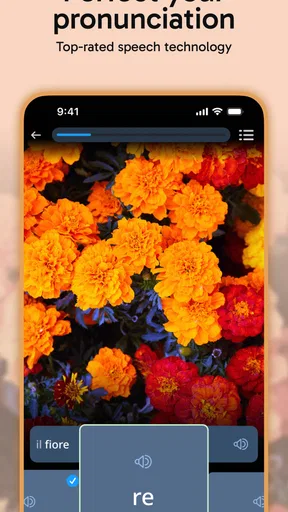
- Speech recognition provides useful pronunciation practice and feedback.
- Courses cover multiple languages in one subscription.
- Short activities make it easy to study during spare moments.
- Progress syncs across devices with a Rosetta Stone account.
Limitations of Rosetta Stone Sapphire
- Grammar explanations can feel too limited for complete beginners.
- Some exercises become repetitive after extended study sessions.
- Advanced learners may find the course content insufficiently deep.
- Offline lesson downloads require planning and available device storage.
- A subscription is relatively expensive compared with some language apps.
Other Releases by Rosetta Stone Ltd
View All
Rosetta Stone Classic (2024)
Education4.6
Similar Picks in This Category
View All
Duolingo: Language Lessons
Duolingo4.7

Google Classroom
Google LLC2.8

Unacademy: Learn & Crack Exams
Unacademy3.2

Bible App for Kids
Life.Church4.4

Cake - Learn English & Korean
Cake Corp.4.7

Brainly: AI Homework Helper
Brainly4.5
Frequently Asked Questions
What is Rosetta Stone Sapphire?
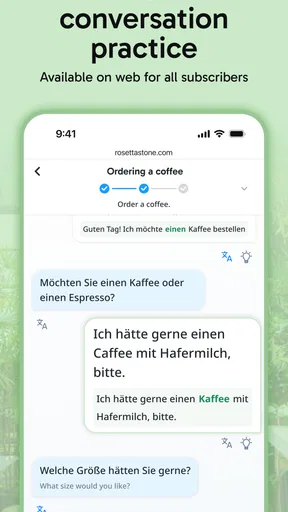
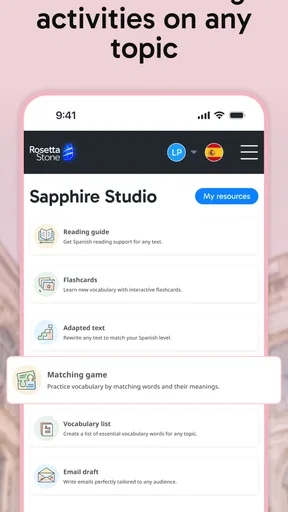
Rosetta Stone Sapphire is a language-learning application designed to help users build practical communication skills through structured lessons, pronunciation practice, vocabulary activities, and listening exercises. It follows Rosetta Stone’s immersion-based approach, encouraging learners to understand meaning through images, audio, and context rather than relying heavily on direct translation. The exact lessons and language options may depend on the account or subscription provided by your organization.
Which languages can I learn with Rosetta Stone Sapphire?
The languages available in Rosetta Stone Sapphire can vary according to the version of the app, your institution, or the subscription connected to your account. Rosetta Stone commonly offers courses such as Spanish, French, Italian, German, and several other major languages, but Sapphire users may receive access to a specific language catalog. Before downloading, check the app listing or your organization’s enrollment information to confirm that your desired language is supported.
Is Rosetta Stone Sapphire free to use?
Downloading Rosetta Stone Sapphire may be free, but access to its complete learning content is generally linked to a paid subscription, school, employer, or other organizational license. Some users may be able to try limited material before signing in, while others must use provided credentials immediately. Because pricing and access rules can differ by region and account type, review the subscription terms carefully before starting a trial or entering payment information.
Can I use Rosetta Stone Sapphire offline?
Offline availability depends on the app version, course configuration, and permissions granted to your account. Some lessons or course materials may be downloaded for use without an internet connection, which is useful when traveling or studying with limited data. However, initial setup, progress synchronization, updates, and certain interactive features may still require connectivity. It is best to download lessons while online and confirm that they open correctly before going offline.
Is Rosetta Stone Sapphire suitable for beginners?
Rosetta Stone Sapphire can be suitable for beginners because its lessons usually introduce vocabulary and sentence patterns gradually, using visual context, repetition, listening, and pronunciation practice. The immersion approach may feel different from apps that provide frequent translations or grammar explanations, so new learners should expect to infer meaning from examples. Consistent daily practice is important, and users seeking advanced conversation, specialized vocabulary, or detailed grammar instruction may need additional resources.
